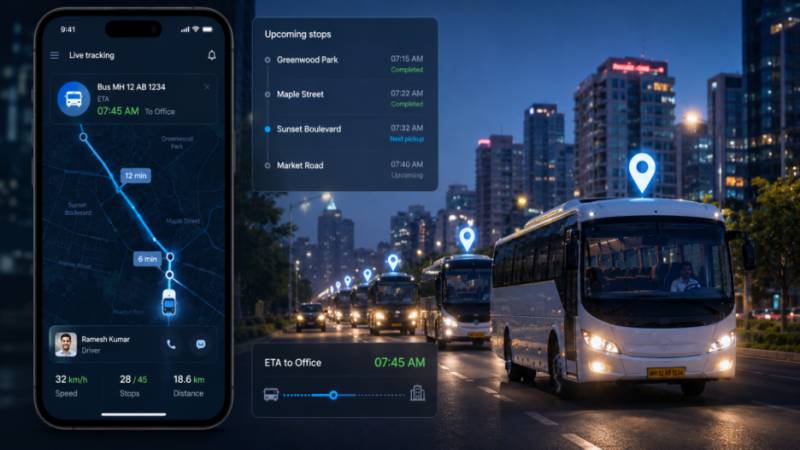
Major transport issues are not caused by a bad driver or a broken bus, that rarely happens. It is usually a logistics problem, for example, not knowing which bus has the problem until HR is informed. That’s the actual failure mode most companies are solving for when they buy employee transport management software, not some vague notion of “modernizing operations.” Below are ten features that address specific, recurring failure points in employee transport, based on what actually breaks when commute operations run without proper software behind them.
1. Live GPS Tracking That Employees Can Actually See
Rider-facing visibility: the map showing where a shuttle is shouldn’t be locked inside an admin dashboard. Employees need to see it too, on their own phone, before they walk outside and wait.
- Vehicle location updates every few seconds, not every few minutes
- Employees can check a bus’s position without calling anyone
- Admins see all active routes on one screen, so a fifteen-minute delay on Route 4 gets caught before six people are standing outside in the rain
Here’s the part people miss. The admin dashboard was never the real bottleneck. It was always the calls. An employee transport management system that only gives visibility to the back office still leaves employees guessing, and guessing is what generates support tickets.
2. Route Optimization That Reacts to Reality, Not a Template
Adaptive routing: a route plan built on Monday shouldn’t still be running unchanged by Thursday if three people moved apartments and two more started working from a different office that week.
- Routes recalculate as pickup locations, headcounts, and traffic change
- Seats get reassigned automatically instead of a coordinator manually rebuilding a spreadsheet
- Fuel and driver-hours drop when routes stop carrying empty seats out of habit
Most companies don’t realize how much a fixed route costs until they actually run the numbers. A route drawn once and left alone for months tends to accumulate waste nobody notices day to day: empty stops nobody removed, detours that made sense in March but not in August. Employee transport route optimization software exists specifically to catch that drift before it becomes a line item finance asks about.
3. An SOS Button That Actually Reaches Someone
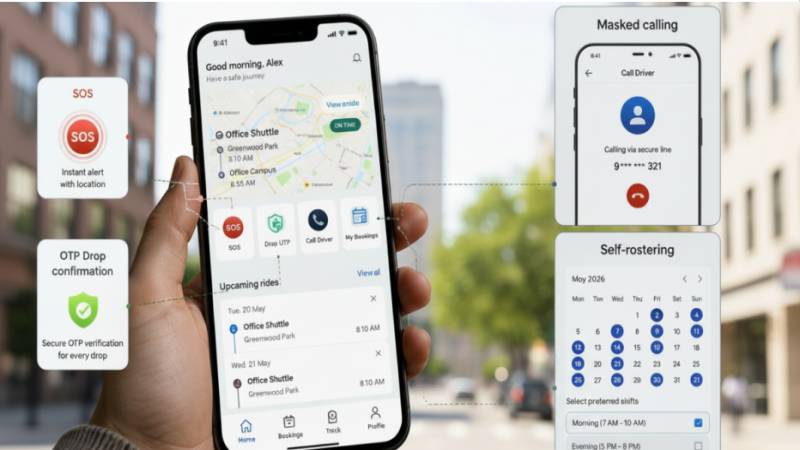
Emergency escalation: pressing SOS inside the app needs to trigger a real, timed response chain, not a silent notification that sits in an inbox until someone happens to check it.
- One tap triggers alerts to transport admins and emergency contacts simultaneously
- Escalation rules kick in if nobody acknowledges the alert within a set window
- Every incident gets logged with a timestamp, useful for review and for proving a response actually happened
We’d argue this is the single feature worth stress-testing before signing anything. Ask the vendor to demonstrate the full chain, from the tap to the human response, not just the button itself. A safety feature that looks good in a demo but has no teeth behind it is worse than not having one, because it creates false confidence.
4. Drop Confirmation That Doesn’t Rely on Trust Alone
Verified arrival: when someone’s workday wraps up at 11 PM, a person besides the driver should be able to confirm they actually got home, not just that the trip was marked complete in a log somewhere.
- OTP sent to the employee at the final stop, confirming arrival directly
- IVR call as a backup for employees who don’t check their phone right away
- A timestamped record any admin can pull up later, without asking the driver to remember
This came up a lot in conversations with transport managers at companies running late-night operations. One admin put it simply. “Trip complete” in a system log means nothing if nobody can say for certain the person got out at the right address. Drop confirmation closes that specific gap.
 5. Number Masking, Because Privacy Complaints Are Preventable
Masked calling: drivers and riders should be able to coordinate a pickup without either side seeing the other’s actual phone number.
- Calls connect through a temporary masked number tied to that trip only
- The connection expires automatically once the ride ends
- Removes an entire category of harassment and unwanted-contact complaints before they start
This feature rarely makes it into a sales pitch, and that’s a mistake on the vendor’s part. It’s cheap to build and expensive to be missing. Ask any HR team that’s had to handle a complaint about a driver texting an employee after hours; they’ll tell you this should have been standard from day one.
6. Self-Rostering Employees Actually Use
Employee-managed schedules: workers should set their own recurring pickup preferences and request one-off rides without emailing anyone or filling out a form that goes nowhere for two days.
- Recurring commute preferences set once, adjusted anytime
- Ad-hoc requests for late nights, early flights, or last-minute plan changes
- Approval rules that keep admins in the loop without turning every request into a manual review
The test here isn’t whether the feature exists. It’s whether employees bother using it instead of just texting the transport coordinator directly, which is what happens when self-service tools are clunky enough that people route around them. Any employee transportation solution worth calling modern gets adopted because it’s genuinely faster than the workaround, not because a policy forces it, and that’s the real measure of good employee commute management design.
7. One Dashboard, Not Five Browser Tabs
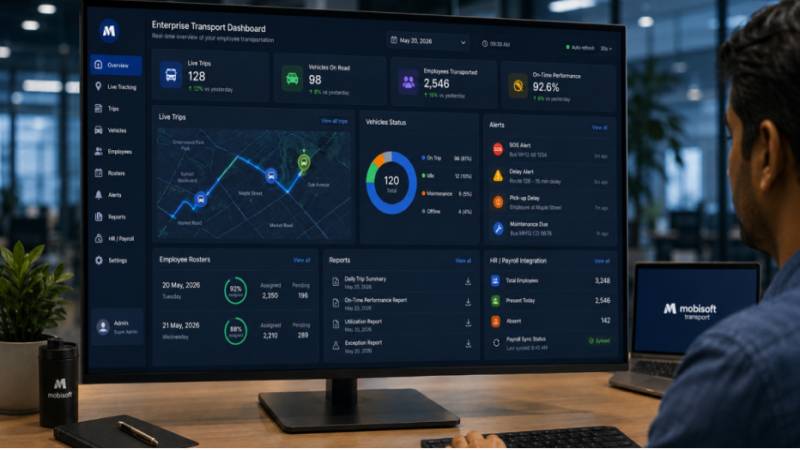
Unified admin control: approvals, rosters, live trip status, and reports should all live in one place, because a transport manager switching between five tools to answer one question about fleet usage is losing hours every week to something software should have solved.
- Every active trip visible on a single screen
- Reports generated automatically instead of exported and reassembled by hand
- Audit-ready logs that don’t require reconstructing a timeline from memory
Ask a transport manager how they currently answer “how many trips ran late this month,” and you’ll usually get a pause before an answer. That pause is the cost of fragmented tools. A properly built corporate transport management dashboard should answer that question in under ten seconds.
8. HR and Payroll Integration That Removes Double Entry
Synced employee records: when someone joins, transfers offices, or leaves the company, the transport system should know automatically instead of an admin re-entering the same data a second time.
- New hires appear in the transport system as soon as HR onboards them
- Trip-based billing syncs with payroll where relevant
- No more discovering three months later that someone who left the company is still on a roster
Every disconnected system is another place data can go stale. An employee transport management solution that doesn’t talk to HR just relocates the manual work instead of eliminating it, usually onto whoever happens to notice the roster looks wrong.
 9. Branding and Language Support That Actually Gets Used
A recognizable, usable app: employees are far more likely to trust and open an app carrying their own company’s name and colors than a generic third-party tool with an unfamiliar logo.
- Company branding applied across employee and driver apps
- Interface available in the languages your workforce actually speaks
- Configuration options that don’t require a developer every time something needs adjusting
We’ve seen adoption numbers move noticeably just from switching an app’s language options, particularly at companies with large frontline or plant-floor workforces where English isn’t the first language for most employees. A workforce mobility solution that ignores this ends up underused, no matter how good the backend is.
10. Certifications Worth Actually Checking, Not Just Trusting
SOC 2 Type II and ISO 27001: these aren’t marketing badges. They mean a third party has reviewed how the vendor handles data, and it’s worth asking when that review last happened rather than assuming a logo on a webpage is current.
- Data encryption and access controls that hold up under a real audit
- A clear answer on cloud versus on-premise deployment, without one option being treated as an afterthought
- Documentation ready to hand to your own compliance team, not assembled after the fact
Deployment flexibility matters more than most buyers expect going in. Some IT teams have no choice but on-premise, for reasons tied to internal policy that won’t bend for a vendor’s default setup. A serious employee transport management system accommodates that instead of pushing everyone toward the same cloud package.
What This Actually Comes Down To
None of these ten features matter much in isolation. What separates a transport system worth paying for from one that just looks good on a sales call is whether these pieces work together, tracking that feeds into safety alerts, rosters that sync with HR, and a dashboard that doesn’t require three other tools to make sense of. Mobisoft’s employee transport management system was built around that kind of integration rather than a checklist of standalone features. If you want to see how it actually handles the messy, specific problems above, book a walkthrough and bring your worst-case scenario with you.See More